A few days ago, I made myself a little present, and bought a 2.5Gbps NIC for my home server (this one precisely)
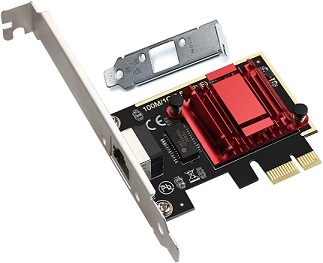
This card uses a Realtek 84125B chip, which is certainly the most common chip used for 2.5NICs. This is the chip you find on almost all cards below 50€, and almost all motherboards with onboard networking.
My home server runs Debian Bullseye (Debian forever!). I look around, check internet, check forums, and everthing seems to indicate that Debian Bullseye includes the required firmware for this chip, so I imagine everything will be good.
So here I am, armed with a screwdriver and impatience. I unplug the server, bring it on the table, I remove the side panel, find a free PCI slot, and install the card. First step done.
The server is reassembled, goes back to its place. I plug a cable between the new card and a 2.5Gbps port on my router. The old 1Gbps NIC remains installed and plugged so I can keep working remotely until I configure the network. I open an SSH session, apt update, apt install firmware-realtek, apt tells me it's already installed, I take it for a good omen..
I check with ip a, and the new card got an IP. Full of confidence, I unplug the old NIC, tinked with the DHCP server to assign the IP to the new card. I feel more and more confident. Until I decide to run a speedtest.
And there, in front of my very own eyes, I notice that I got from a stable and repeatable download speed of 941Mbps, to less than that, and even almost half in some cases. I am dumbfounded. What was supposed to be a simple PCI card switch will turn to a mind boggling puzzle.
But I still had a glimmer of hope. See, during my preliminary research, I noticed a famous name, Jeff Geerling. Ok, if you don't know Jeff Geerling, and you are reading MY blog, something must have gone wrong in your research.
Jeff Geerling, was I saying, wrote an article a few months ago on the subject. Basically, he recommended to use the firmware provided by Realtek instead of the ones provided by Debian (or Raspberry in his case). HAHA! So that's what I need!
Full of renewed hope, I download the latest drivers available (9.009.02 as of today) (9.014.01Realtek changed their website, so here's the updated link and available version), and run the provided installation script. Everything will be fine, right?

You see, as the good tinkerer that I am, I completely ignored the README file provided in the Realtek file. This README includes a little paragraph, at the bottom, just a few lines:
Requirements
- Kernel source tree (supported Linux kernel 2.6.x and 2.4.x)
- For linux kernel 2.4.x, this driver supports 2.4.20 and latter.
- Compiler/binutils for kernel compilation
This paragraph did not mark me at first. I had already installed the common build tools and suites, and I did not think I needed the FULL kernel source tree. I was half-wrong.
Because in Jeff Geerling's article, I should have paid more attention to the first command he runs:sudo apt-get install -y raspberrypi-kernel-headers. Which makes sens, as the kernel headers are there to provide the necessary references for build tools. So I was right, no need for the full source tree, you just need the headers.
And I did not pay a lot of attention, because I was so sure they were already installed! And that was a big mistake
Because if you run the ./autorun.sh from Realtek, the first thing it does is to unload kernel modules for the your NICs:
echo "Check old driver and unload it."
check=`lsmod | grep r8169`
if [ "$check" != "" ]; then
    echo "rmmod r8169"
    /sbin/rmmod r8169
fi

check=`lsmod | grep r8125`
if [ "$check" != "" ]; then
    echo "rmmod r8125"
    /sbin/rmmod r8125
fi
And when the modules are unloaded, your device is not recognized by the OS anymore. So here I am, a fool of a man, with a server completely offline. No more network = no more ssh + no more internet.
I needed to go on another PC, download the required packages for the kernel headers (i.e. linux-header-amd64, linux-headers-5.18.0-0.deb11.4-amd64, linux-headers-5.18.0-0.deb11.4-common et linux-kbuild-5.18 - I did not go further in the dependencies, as I knew I had the required packages already installed). I put everything on a flashdrive, mounted it on the server (lsblk to check the device name and partition, mount /dev/sdk1 /tmp, cd /tmp, apt install ./*.deb), and finally, I was able to run the Realtek autorun one last time.
FINALLY!! FINALLY!! I had the manufacturer's firmware, last version, I spent a lot of time on this problem, far too much, and with a last sparkle of hope, always renewed and reinforced with all those struggles.
A final reboot, a final speedtest, and putain de bordel de merde de carte réseau à la con, chier!! 400MBS???!!???!!?? 400 effing megabits? only!!!?? Stupid mutualized fiber optics!! Of course, in the evening, everybody's home, using internet, streaming movies, and in a 120 apartments buildings, that makes a lot of people.
Well, I decided to sleep on it, and the next day, I try again. There we are, about 2300Mbps, which is what I expected. Cool.
Conclusion: if you need to install the REALTEK firmware, make sure to be connected locally (or with a second NIC), and install the headers BEFORE! (apt install linux-headers-$(uname -r))